 |
 |
HardMon is a Windows-based hardware monitoring solution designed to provide full visibility into system performance in real time. Developed with a focus on stability, compatibility, and efficiency, HardMon runs optimally on a wide range of devices, from desktop PCs and laptops to servers.
Built with a focus on stability and compatibility, HardMon is capable of running well even on legacy systems, while providing modern features such as web-based monitoring for remote access.
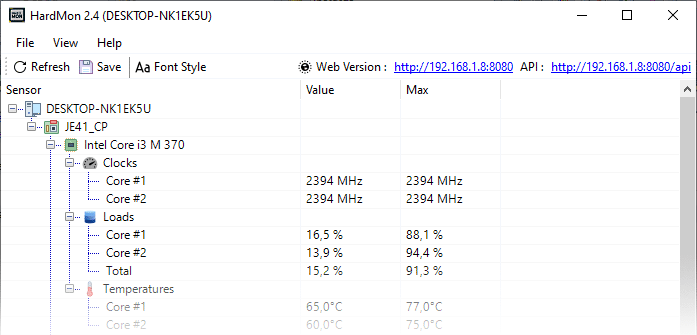
Key Features
Real-Time Hardware Monitoring
Monitor various key components directly:
- CPU (usage, temperature, clock)
- GPU (load, temperature)
- RAM (usage)
- Storage (HDD/SSD activity & temperature)
- Battery (laptop only)
- Network (upload & download)
Built-in Web Monitoring (Remote Access)
HardMon comes with a built-in web server that lets you:
- Access monitoring through a browser
- View data from other devices on the network
- Integrate data with other systems through API endpoints
        {
          "id": "s0",
          "name": "Core #1",
          "value": "2394 MHz",
          "min": "2394 MHz",
          "max": "2394 MHz",
          "unit": ""
        }
Structured Tree Monitoring UI
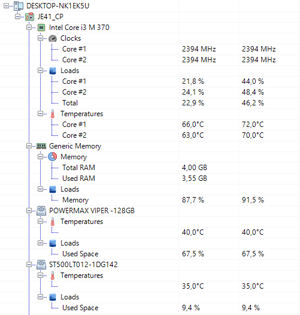
Data is displayed in the form of a hierarchical structure (tree view):
- Easy to read
- Organized by device and category
- Shows Value and Max simultaneously
Export Data Monitoring
- Save monitoring data to a file (.txt)
- Suitable for analysis, documentation, or troubleshooting
Automatic Battery Report (Laptop)
For devices with batteries:
- The system automatically generates a battery health report.
- Useful for diagnosing long-term battery performance.
System Requirements
- Windows (7 to Windows 11)
- Administrator permissions (for some sensors and battery reporting)
Download HardMon SDK (HardMonLib.dll) .NET Library
| Version | Size | Support | Download |
| 2.9 | 125 KB | x86-x64 | Download |
| 2.8 | 125 KB | x86-x64 | Download |
| 2.7 | 126 KB | x86-x64 | Download |
| 2.5 | 278 KB | x86-x64 | Download |
| 2.4 | 125 KB | x86-x64 | Download |
| Read SDK Documentation | |||
Copyright (c) 2015 - 2026 ARImetic. All rights reserved.
License terms
|
|||||||||||
| Support Development | |||||||||||
| hardmonitor@hotmail.com |
| SDK Documentation |
| Author |
| Tag |
| Hardware Microsoft Windows CPU GPU RAM HDD Display Monitor Clock Load Temperature Power |